
When to use this configuration
Use this configuration when the LG TV uses TLT RS232 control. This is less common than MPI control and requires a pillow speaker adapter for non-LG Pro:Centric pillow speakers.
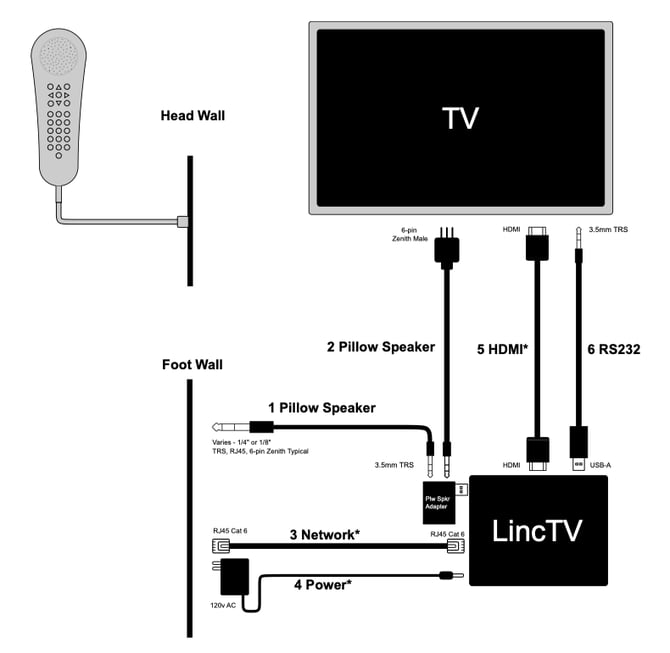
Connections
-
Connect the pillow speaker wall jack to the pillow speaker adapter using the appropriate connector for the room.
-
Connect the 6-pin Zenith pillow speaker connection to the adapter's 3.5 mm TRS connection.
-
Connect the LincTV device to the network using Cat 6 Ethernet.
-
Connect LincTV power to a 120V AC outlet using the supplied power adapter.
-
Connect the LincTV device to the TV with HDMI.
-
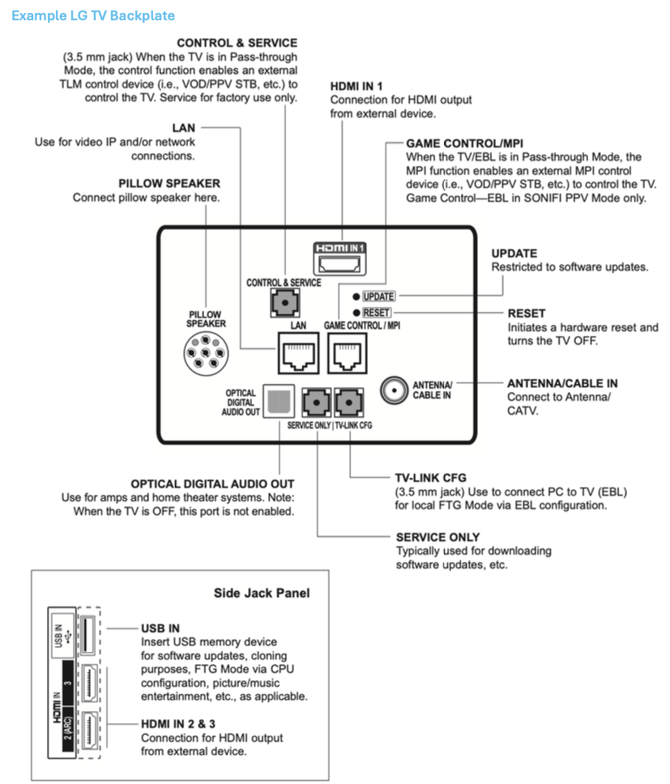
Connect the TV-control cable to the TV's TLT RS232 Control and Service port using the 3.5 mm TRS connection.
Included with LincTV
The network cable, power adapter, HDMI cable, and TV-control cable are included in LincTV packaging unless otherwise specified.